Web pluginy umožňují vytvářet vlastní uživatelské přehledy s využitím registrovaných web komponent. Pluginy jsou načítány dynamicky ze složky AktionNEXT\eNextWeb\assets\plugins a mohou využívat autentizaci a další služby poskytované hlavní aplikací. V adresáři lze najít i vzorový plugin example-plugin.js.
Do adresáře assets, vytvoříte javaScriptový soubor, například: nazevPluginu.js
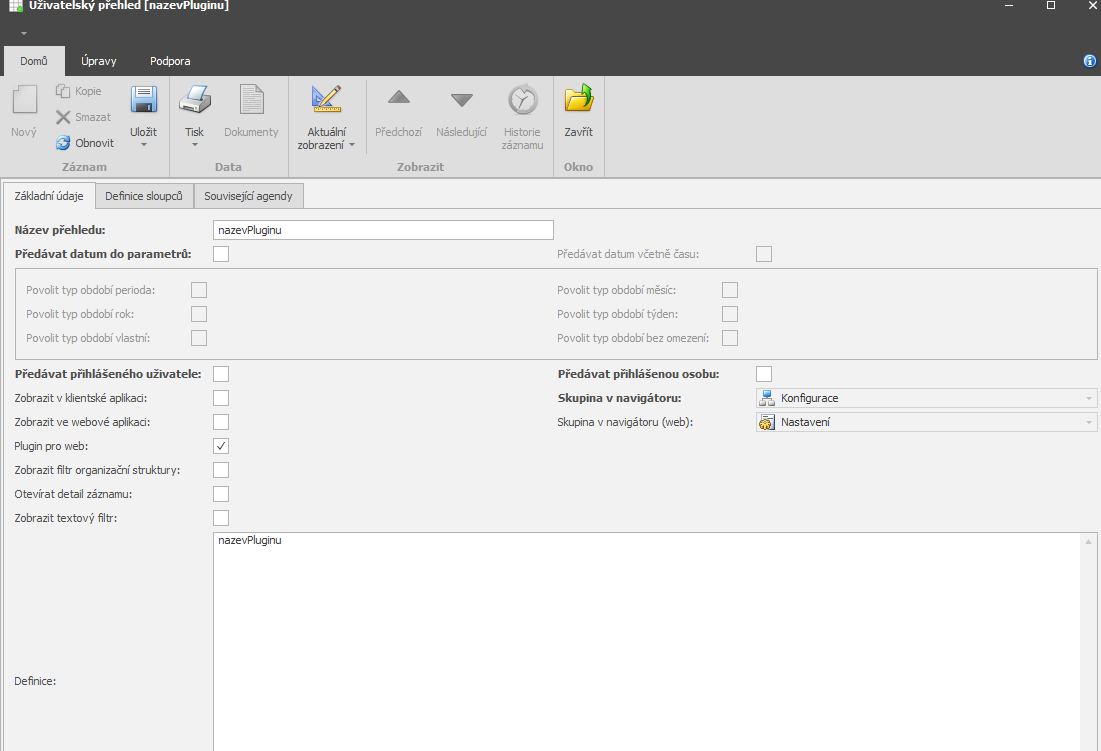
Po vytvoření souboru, musíte vytvořit v systému uživatelský přehled, ten najdete v agendě Číselníky → Uživatelské přehledy.
Dále vytvořte stejnojmenný přehled, aby plugin fungoval musíte nastavit:
Název a definici musí mít stejný název jako je název plugninu
Zašrktnuté “Plugin pro web”
```javascript
window.PLUGIN = window.PLUGIN || {};

// (Volitelné) Načtení stylů
(function loadStyles() {
  const styleId = 'plugin-styles';
  if (document.getElementById(styleId)) {
    return;
  }

  const style = document.createElement('style');
  style.id = styleId;
  style.textContent = `
    /* Vaše CSS styly zde */
    .muj-plugin {
      padding: 20px;
    }
  `;

  document.head.appendChild(style);
})();

// Inicializační funkce pluginu
window.PLUGIN.init = function (containerId) {
  const container = document.getElementById(containerId || 'plugin-root');

  if (!container) {
    console.error('Container element not found');
    return;
  }

  // Vytvoření HTML obsahu s využitím web komponent
  const content = `
    <div class="muj-plugin">
      <app-card variant="outlined">
        <app-card-content>
          <app-typography variant="h4">Můj plugin</app-typography>
          <app-typography variant="body1">Hello World!</app-typography>
        </app-card-content>
      </app-card>
    </div>
  `;

  container.innerHTML = content;

  // (Volitelné) Registrace event listenerů
  container.addEventListener('click', (event) => {
    // Vaše handler logika
  });
};
```Namespace
window.PLUGIN = window.PLUGIN || {};Init funkce
window.PLUGIN.init = function(containerId) { ... }Návratová hodnota - funkce musí nastavit “container.innerHTML“ s html obsahem
windows.authAPI
```javascript
// Získání aktuálního tokenu
const token = window.authApi?.getToken();
// Vrací: string | null

// Získání tokenu a případné obnovení pokud expiroval
const token = await window.authApi?.getAndRefreshToken();
// Vrací: Promise<string | null>

// Získání informací o přihlášeném uživateli
const user = window.authApi?.getUser();
// Vrací: { userName, personName, ... } | null

// Kontrola, zda je token expirován
const expired = window.authApi?.isTokenExpired();
// Vrací: boolean

// Obnovení tokenu
const newToken = await window.authApi?.renewToken();
// Vrací: Promise<string | null>
```

#### Příklad použití:

```javascript
const user = window.authApi?.getUser();
const tokenExpired = window.authApi?.isTokenExpired();

container.innerHTML = `
  <app-alert severity="info">
    Uživatel: ${user ? `${user.personName || user.userName}` : 'nepřihlášen'}
    (${tokenExpired ? 'token expirován' : 'přihlášen'})
  </app-alert>
`;
```window.gerAvailableWebComponents()
```javascript
const components = window.getAvailableWebComponents?.() || [];
// Vrací: string[] - pole názvů tagů, např. ["app-button", "app-card", ...]
```Pro detailní dokumentaci vlastností a API jednotlivých MUI komponent navštivte: MUI dokumentaci
Příklady využití komponent:
#### Alert

- **Tag**: `<app-alert>`
- **Atributy**: `severity` (error|warning|info|success), `variant` (standard|filled|outlined)
- **Dokumentace**: https://mui.com/material-ui/react-alert/

```html
<app-alert severity="warning">Varování!</app-alert>
<app-alert severity="success">Úspěch!</app-alert>
```

#### Avatar

- **Tag**: `<app-avatar>`
- **Atributy**: `alt`, `src`, `variant` (circular|rounded|square)
- **Dokumentace**: https://mui.com/material-ui/react-avatar/

```html
<app-avatar alt="John Doe" src="https://example.com/avatar.jpg"></app-avatar>
<app-avatar variant="rounded" src="/path/to/image.jpg"></app-avatar>
```

#### Badge

- **Tag**: `<app-badge>`
- **Atributy**: `badgecontent`, `color` (default|primary|secondary|error|info|success|warning), `variant`, `max`
- **Dokumentace**: https://mui.com/material-ui/react-badge/

```html
<app-badge badgecontent="4" color="primary">
  <app-avatar alt="User" src="/avatar.jpg"></app-avatar>
</app-badge>
```

**Poznámka**: Badge vyžaduje children element, který obalení. Můžete použít jiné web komponenty jako children.

#### Button

- **Tag**: `<app-button>`
- **Atributy**: `variant` (text|outlined|contained), `color` (primary|secondary|error|warning|info|success), `size` (small|medium|large), `disabled` (boolean), `fullwidth` (boolean)
- **Dokumentace**: https://mui.com/material-ui/react-button/

```html
<app-button variant="contained" color="primary">Klikni</app-button>
<app-button variant="outlined" disabled>Zakázáno</app-button>
<app-button variant="text" size="small">Malé tlačítko</app-button>
```

**Poznámka**: Pro boolean atributy stačí uvést atribut bez hodnoty:

```html
<app-button disabled>Zakázáno</app-button>
<!-- je stejné jako -->
<app-button disabled="true">Zakázáno</app-button>
```

#### Card a CardContent

- **Tag**: `<app-card>` a `<app-card-content>`
- **Card atributy**: `variant` (elevation|outlined), `elevation` (0-24)
- **Dokumentace**: https://mui.com/material-ui/react-card/

```html
<app-card variant="outlined">
  <app-card-content>
    <app-typography variant="h5">Nadpis karty</app-typography>
    <app-typography variant="body2">Obsah karty</app-typography>
  </app-card-content>
</app-card>
```

#### Chip

- **Tag**: `<app-chip>`
- **Atributy**: `label`, `color` (default|primary|secondary|error|info|success|warning), `variant` (filled|outlined), `size` (small|medium)
- **Dokumentace**: https://mui.com/material-ui/react-chip/

```html
<app-chip label="Aktivní" color="success"></app-chip>
<app-chip label="Tag" variant="outlined"></app-chip>
```

#### CircularProgress

- **Tag**: `<app-circular-progress>`
- **Atributy**: `color` (primary|secondary|error|info|success|warning|inherit), `size` (číslo), `variant` (determinate|indeterminate), `value` (0-100)
- **Dokumentace**: https://mui.com/material-ui/react-progress/

```html
<app-circular-progress color="primary"></app-circular-progress>
<app-circular-progress variant="determinate" value="75"></app-circular-progress>
```

#### Divider

- **Tag**: `<app-divider>`
- **Atributy**: `orientation` (horizontal|vertical), `variant` (fullWidth|inset|middle), `textalign` (left|center|right), `flexitem` (boolean)
- **Dokumentace**: https://mui.com/material-ui/react-divider/

```html
<app-divider></app-divider>
<app-divider orientation="horizontal" textalign="center">STŘED</app-divider>
```

#### LinearProgress

- **Tag**: `<app-linear-progress>`
- **Atributy**: `color` (primary|secondary|error|info|success|warning|inherit), `variant` (determinate|indeterminate|buffer|query), `value` (0-100), `valuebuffer` (0-100)
- **Dokumentace**: https://mui.com/material-ui/react-progress/

```html
<app-linear-progress color="primary"></app-linear-progress>
<app-linear-progress variant="determinate" value="50"></app-linear-progress>
```

#### Link

- **Tag**: `<app-link>`
- **Atributy**: `href`, `color` (primary|secondary|error|info|success|warning|inherit), `underline` (none|hover|always), `variant`
- **Dokumentace**: https://mui.com/material-ui/react-link/

```html
<app-link href="#" color="primary">Primární odkaz</app-link>
<app-link href="https://example.com" underline="always">Vždy podtržené</app-link>
```

#### Paper

- **Tag**: `<app-paper>`
- **Atributy**: `elevation` (0-24), `variant` (elevation|outlined), `square` (boolean), `sx` (JSON string pro styling)
- **Dokumentace**: https://mui.com/material-ui/react-paper/

```html
<app-paper elevation="3">
  <div style="padding: 20px;">Obsah</div>
</app-paper>

<!-- Použití sx prop pro pokročilé stylování -->
<app-paper sx='{"p": 2.5, "width": 200, "textAlign": "center"}'>
  <div>Centrovaný obsah</div>
</app-paper>
```

**Poznámka**: `sx` prop přijímá JSON string s MUI sx hodnotami.

#### Skeleton

- **Tag**: `<app-skeleton>`
- **Atributy**: `variant` (text|circular|rectangular|rounded), `animation` (pulse|wave|false), `width` (číslo), `height` (číslo)
- **Dokumentace**: https://mui.com/material-ui/react-skeleton/

```html
<app-skeleton variant="text" width="200" height="30"></app-skeleton>
<app-skeleton variant="circular" width="40" height="40"></app-skeleton>
<app-skeleton variant="rectangular" width="300" height="100"></app-skeleton>
```

#### Typography

- **Tag**: `<app-typography>`
- **Atributy**: `variant` (h1|h2|h3|h4|h5|h6|subtitle1|subtitle2|body1|body2|caption|button|overline), `color` (textPrimary|textSecondary|primary|secondary|error|...), `align` (left|center|right|justify)
- **Dokumentace**: https://mui.com/material-ui/react-typography/

```html
<app-typography variant="h3">Nadpis</app-typography>
<app-typography variant="body1" color="textSecondary">Sekundární text</app-typography>
<app-typography variant="caption">Malý text</app-typography>
```

### 5.2 Vlastní komponenty (2)

#### Loading

- **Tag**: `<app-loading>`
- **Atributy**: `message` (text), `height` (číslo v px)
- **Popis**: Zobrazí loading indikátor se zprávou

```html
<app-loading message="Načítám data..." height="100"></app-loading>
```

#### HtmlWhiteTooltip

- **Tag**: `<app-white-tooltip>`
- **Atributy**: `text` (HTML string), `placement` (top|bottom|left|right|top-start|top-end|...)
- **Popis**: Bílý tooltip s podporou HTML obsahu
- **Children**: Musí obsahovat jeden child element

```html
<!-- Jednoduchý tooltip -->
<app-white-tooltip text="Nápověda" placement="top">
  <app-button variant="outlined">Tlačítko s nápovědou</app-button>
</app-white-tooltip>

<!-- HTML formátování -->
<app-white-tooltip text="<b>Tučný</b> a <i>kurzíva</i>" placement="bottom">
  <app-chip label="Info" color="info"></app-chip>
</app-white-tooltip>

<!-- Komplexní data -->
<app-white-tooltip
  text="<div style='text-align: left;'><b>Uživatel:</b> Jan Novák<br><b>Email:</b> [email protected]<br><b>Status:</b> <span style='color: green;'>Aktivní</span></div>"
  placement="right"
>
  <app-chip label="Zobraz info"></app-chip>
</app-white-tooltip>Pro lepší výkon používejte event delegation - poslouchejte na containeru místo jednotlivých elementů:
```javascript
window.PLUGIN.init = function (containerId) {
  const container = document.getElementById(containerId || 'plugin-root');

  let clickCounter = 0;

  const content = `
    <div>
      <app-button variant="contained" data-action="increment">+1</app-button>
      <app-button variant="contained" data-action="decrement">-1</app-button>
      <app-typography variant="h5" id="counter">0</app-typography>
    </div>
  `;

  container.innerHTML = content;

  // Event listener na containeru
  container.addEventListener('click', (event) => {
    const target = event.target.closest('[data-action]');
    if (!target) return;

    const action = target.getAttribute('data-action');
    const counterEl = document.getElementById('counter');

    if (action === 'increment') {
      clickCounter++;
    } else if (action === 'decrement') {
      clickCounter--;
    }

    if (counterEl) {
      counterEl.textContent = clickCounter;
    }
  });
};
``````javascript
container.addEventListener('click', async (event) => {
const target = event.target.closest('[data-action="refresh-token"]');
if (!target) return;
target.setAttribute('disabled', 'true');
target.textContent = 'Obnovuji...';
try {
const newToken = await window.authApi?.renewToken();
if (newToken) {
target.textContent = 'Token obnoven!';
} else {
target.textContent = 'Chyba';
}
} finally {
setTimeout(() => {
target.removeAttribute('disabled');
target.textContent = 'Obnovit Token';
}, 2000);
}
});
``````javascript
const dynamicContentId = 'dynamic-area';
const content = `
<div>
<app-button data-action="show-info">Zobraz info</app-button>
<div id="${dynamicContentId}"></div>
</div>
`;
container.innerHTML = content;
container.addEventListener('click', (event) => {
if (event.target.closest('[data-action="show-info"]')) {
const dynamicArea = document.getElementById(dynamicContentId);
dynamicArea.innerHTML = `
<app-alert severity="info">
Dynamicky vložený obsah!
</app-alert>
`;
}
});
``````javascript
(function loadStyles() {
const styleId = 'muj-plugin-styles';
if (document.getElementById(styleId)) return;
const style = document.createElement('style');
style.id = styleId;
style.textContent = `
.muj-plugin-wrapper {
padding: 20px;
max-width: 1200px;
margin: 0 auto;
}
.muj-plugin-grid {
display: grid;
grid-template-columns: repeat(auto-fit, minmax(300px, 1fr));
gap: 20px;
}
.muj-plugin-header {
background: linear-gradient(135deg, #667eea 0%, #764ba2 100%);
color: white;
padding: 30px;
border-radius: 12px;
margin-bottom: 30px;
}
`;
document.head.appendChild(style);
})();
``````html
<div style="display: flex; gap: 10px; flex-wrap: wrap;">
<app-button variant="contained">Tlačítko 1</app-button>
<app-button variant="outlined">Tlačítko 2</app-button>
</div>
```Pro komponenty podporující “sx” například “Paper“:
```html
<app-paper sx='{"p": 3, "bgcolor": "background.paper", "borderRadius": 2}'>
  <div>Stylovaný Paper</div>
</app-paper>
``````javascript
window.PLUGIN.init = function (containerId) {
const container = document.getElementById(containerId || 'plugin-root');
if (!container) {
console.error('Plugin container not found:', containerId);
return;
}
// Pokračování s inicializací...
};
``````javascript
// Vždy použijte optional chaining (?.)
const user = window.authApi?.getUser();
const components = window.getAvailableWebComponents?.() || [];
// Kontrola existence před použitím
if (window.authApi) {
const token = window.authApi.getToken();
// ...
}
``````javascript
window.PLUGIN.init = function (containerId) {
console.log('Plugin inicializován s containerId:', containerId);
const user = window.authApi?.getUser();
console.log('Aktuální uživatel:', user);
const components = window.getAvailableWebComponents?.();
console.log('Dostupné komponenty:', components);
// ... zbytek kódu
};
``````javascript
window.PLUGIN.init = function(containerId) {
try {
const container = document.getElementById(containerId || 'plugin-root');
if (!container) {
throw new Error(`Container ${containerId} not found`);
}
// Inicializace pluginu
container.innerHTML = /* ... */;
} catch (error) {
console.error('Plugin initialization failed:', error);
// Zobrazení chyby uživateli
const errorContainer = document.getElementById(containerId);
if (errorContainer) {
errorContainer.innerHTML = `
<app-alert severity="error">
Plugin se nepodařilo načíst: ${error.message}
</app-alert>
`;
}
}
};
``````javascript
window.PLUGIN = window.PLUGIN || {};
// Načtení stylů
(function loadStyles() {
const styleId = 'demo-plugin-styles';
if (document.getElementById(styleId)) return;
const style = document.createElement('style');
style.id = styleId;
style.textContent = `
.demo-plugin {
padding: 20px;
max-width: 1200px;
margin: 0 auto;
}
.demo-grid {
display: grid;
gap: 20px;
margin-top: 20px;
}
`;
document.head.appendChild(style);
})();
// Inicializace pluginu
window.PLUGIN.init = function (containerId) {
const container = document.getElementById(containerId || 'plugin-root');
if (!container) {
console.error('Container not found');
return;
}
// Získání dat z authApi
const user = window.authApi?.getUser();
const tokenExpired = window.authApi?.isTokenExpired();
// Vytvoření obsahu
const content = `
<div class="demo-plugin">
<!-- Header -->
<app-card variant="outlined">
<app-card-content>
<app-typography variant="h4">Demo Plugin</app-typography>
<app-typography variant="body2">
Uživatel: ${user ? user.personName || user.userName : 'Nepřihlášen'}
${tokenExpired ? '(Token expirován)' : ''}
</app-typography>
</app-card-content>
</app-card>
<!-- Interaktivní část -->
<div class="demo-grid">
<app-card variant="outlined">
<app-card-content>
<app-typography variant="h6">Počítadlo kliknutí</app-typography>
<div style="display: flex; gap: 10px; align-items: center; margin-top: 10px;">
<app-button variant="contained" color="primary" data-action="increment">
+1
</app-button>
<app-button variant="contained" color="secondary" data-action="decrement">
-1
</app-button>
<app-button variant="outlined" data-action="reset">
Reset
</app-button>
<app-typography variant="h5" id="counter">0</app-typography>
</div>
</app-card-content>
</app-card>
<app-card variant="outlined">
<app-card-content>
<app-typography variant="h6">Akce</app-typography>
<div style="display: flex; gap: 10px; margin-top: 10px;">
<app-button variant="contained" color="info" data-action="show-components">
Seznam komponent
</app-button>
<app-button variant="contained" color="success" data-action="refresh-token">
Obnovit Token
</app-button>
</div>
</app-card-content>
</app-card>
<!-- Dynamický obsah -->
<div id="dynamic-content"></div>
</div>
</div>
`;
container.innerHTML = content;
// Event handling
let counter = 0;
container.addEventListener('click', async (event) => {
const target = event.target.closest('[data-action]');
if (!target) return;
const action = target.getAttribute('data-action');
const counterEl = document.getElementById('counter');
const dynamicContent = document.getElementById('dynamic-content');
switch (action) {
case 'increment':
counter++;
if (counterEl) counterEl.textContent = counter;
break;
case 'decrement':
counter--;
if (counterEl) counterEl.textContent = counter;
break;
case 'reset':
counter = 0;
if (counterEl) counterEl.textContent = counter;
break;
case 'show-components':
const components = window.getAvailableWebComponents?.() || [];
if (dynamicContent) {
dynamicContent.innerHTML = `
<app-card variant="outlined">
<app-card-content>
<app-typography variant="h6">
Dostupné komponenty (${components.length})
</app-typography>
<ul style="margin: 10px 0;">
${components.map((comp) => `<li><code><${comp}></code></li>`).join('')}
</ul>
</app-card-content>
</app-card>
`;
}
break;
case 'refresh-token':
target.setAttribute('disabled', 'true');
const originalText = target.textContent;
target.textContent = 'Obnovuji...';
try {
const newToken = await window.authApi?.renewToken();
if (newToken) {
if (dynamicContent) {
dynamicContent.innerHTML = `
<app-alert severity="success">Token úspěšně obnoven!</app-alert>
`;
}
} else {
if (dynamicContent) {
dynamicContent.innerHTML = `
<app-alert severity="error">Nepodařilo se obnovit token</app-alert>
`;
}
}
} catch (error) {
console.error('Token refresh error:', error);
} finally {
setTimeout(() => {
target.removeAttribute('disabled');
target.textContent = originalText;
}, 2000);
}
break;
}
});
};
```
## 10. Troubleshooting
### Problem: Plugin se nenačte
- Zkontrolujte, že název souboru přesně odpovídá `webPluginName` v záznamu Uživatelský přehled
- Zkontrolujte cestu: `public/assets/plugins/{NazevPluginu}.js`
- Zkontrolujte konzoli prohlížeče pro JavaScript chyby
### Problem: Komponenty se nezobrazují
- Zkontrolujte, že používáte správné názvy tagů (např. `app-button`, ne `button`)
- Zkontrolujte, že web komponenty jsou inicializovány (spustí se automaticky při načtení aplikace)
- Zkontrolujte atributy - některé vyžadují konkrétní hodnoty
### Problem: Event handlery nefungují
- Používejte event delegation na containeru
- Zkontrolujte, že element má atribut `data-action` nebo podobný identifikátor
- Zkontrolujte konzoli pro chyby v event handleru
### Problem: Styly nefungují
- Zkontrolujte, že `styleId` je unikátní a načítání stylů má guard (`if (document.getElementById(styleId))`)
- Zkontrolujte, že CSS selektory jsou správné
- Zkontrolujte specifičnost CSS
## 11. Checklist pro vytvoření pluginu
- [ ] Vytvořen soubor v `public/assets/plugins/{NazevPluginu}.js`
- [ ] Název souboru odpovídá `webPluginName` v systému
- [ ] Vytvořen záznam Uživatelský přehled s `isWebPlugin = true`
- [ ] Plugin má namespace `window.PLUGIN`
- [ ] Plugin má `init` funkci
- [ ] `init` funkce kontroluje existenci containeru
- [ ] Používají se pouze podporované web komponenty
- [ ] Event handling přes event delegation
- [ ] Bezpečné použití `window.authApi` (optional chaining)
- [ ] Styly načteny s guard pro duplicity
- [ ] Plugin testován v prohlížeči
- [ ] Kontrola konzole pro chyby
---