
What you will learn in the manual
How attendance regulations work, what they are used for, and how to correctly create them and assign them to employees.
Configuration
Attendance regulations are used to simplify the entry of attendance parameters (Type of employment, Local calendar, Working time model and Calendar template) for individual persons when creating a new person or editing an existing person belonging to a certain group. For example, we have a group of workers for whom the attendance parameters will be the same. In the Attendance Regulation agenda, we create a kind of named template (Attendance Regulation), which we will assign to individual employees in the person detail, and we only select from when and, if applicable, until when it should be valid.
In the detail of the new regulation, it is necessary to enter a name so that it is clear for whom it is intended. Furthermore, the characteristic parameters for this group are selected:
Type of employment – selection of the employment relationship.
Local calendar – for defining the days of the week and public holidays (Czech/Slovak).
Working time model – main calculation characteristics.
Calendar template – shifts to be assigned to the worker are defined in it.
Note: If you want to automatically add shifts from the Working Time Model (entered on the Shifts tab), it is necessary to create a Calendar Template named e.g. “Empty”, where only the Cycle length 0, Local calendar: Czech will be set, and then select it in the Calendar template item.
Assigning an Attendance Regulation to a Person
In the Administration group of agendas, click the Persons icon. In the list, open the details of the person to whom you want to assign the attendance regulation. Switch to the Attendance tab and on the Attendance regulation sub-tab click the Add button. From the list, double-click to select the required one (here Workers for an indefinite period), if necessary change the Valid from date (the current date is set automatically) and save the record. Details on the option of mass assignment of the attendance regulation to multiple persons at once are given in the help for the Attendance overview agenda in the section Mass change.
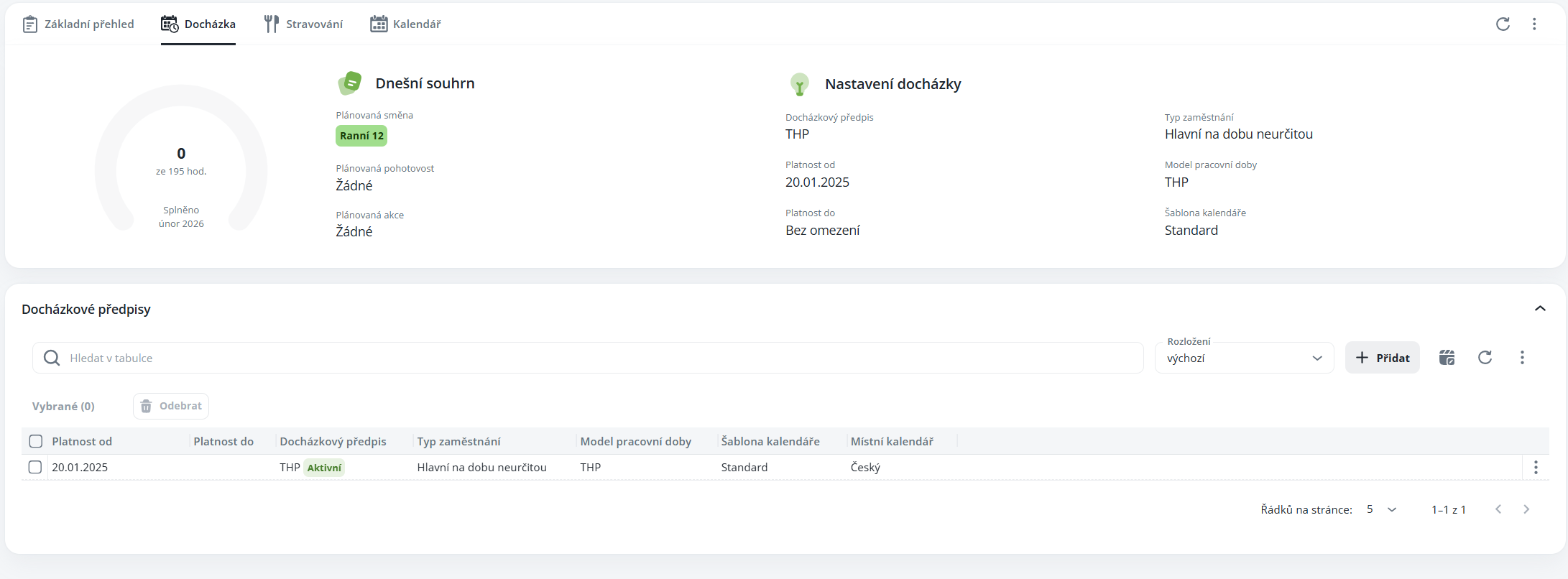
Note: If, for example, the employee’s Working Time Model and Calendar Template change, it is necessary to add a different attendance regulation for them and set Valid to for the existing one.